Uplink decoder
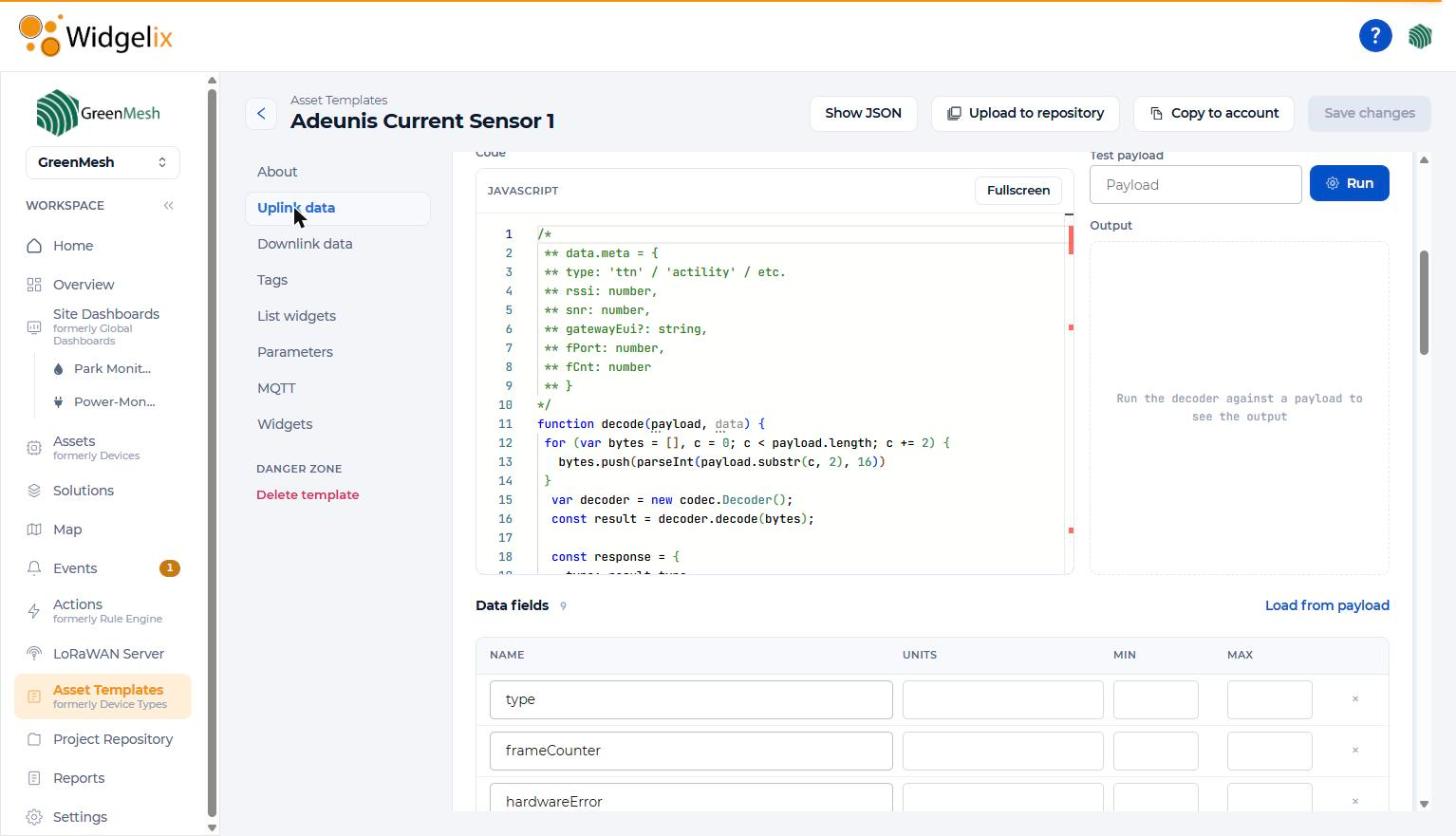
A JavaScript function receives the payload as HEX plus network metadata (type, RSSI, SNR, gateway EUI, fPort, fCnt) and returns named values.
Every IoT device speaks its own binary format. In Widgelix you write a short JavaScript decoder once, test it on a real payload, and reuse it for every device of that model. Using a popular sensor? It probably already has a ready decoder in the supported devices catalogue.
A LoRaWAN or Sigfox sensor sends a few bytes of HEX. Before anyone can see a temperature, someone has to find the vendor's codec, adapt it to the platform, map the fields and units, and repeat the work for every project. Proprietary devices often have no ready decoder at all.
If your device is in the supported devices catalogue, load its ready template and you are done. For anything else, create an asset template from scratch.
Write a decode(payload, data) function in JavaScript. Paste a real HEX payload into the test console, click Run and check the output before saving.
Every device you attach to the template uses the same decoder. Decoded fields feed dashboards, actions, reports and AI agents immediately.
Asset templates (formerly device types) hold the decoding, data model and default views for a device model.
A JavaScript function receives the payload as HEX plus network metadata (type, RSSI, SNR, gateway EUI, fPort, fCnt) and returns named values.
Turn a JSON command into the HEX payload the device expects. Its fields drive the Downlink Button widget, the asset Downlinks tab and downlink actions.
Declare which decoded values to store, with units and expected min/max. Load all fields at once from a sample decoded payload.
Decoders can keep persistent storage per device between messages, for counters, deltas and baselines, without an extra backend.
Read the device ID or latitude/longitude from decoded fields, so trackers and gateways that forward many devices appear correctly on maps.
Define tags such as floor, room or measured object, the list widgets shown in the assets list, and the default dashboard for every device of the model.
Copy a template to another organisation you manage, or share it through the project repository so partners can install it.
AI agents connected through the Widgelix MCP server can write a decoder and test it against a sample payload before saving the template.
Popular sensors from vendors such as Milesight, Dragino, Elsys, Tektelic, Adeunis and MClimate already have verified decoders in the supported devices catalogue. Load the template and skip the coding.
Browse supported devices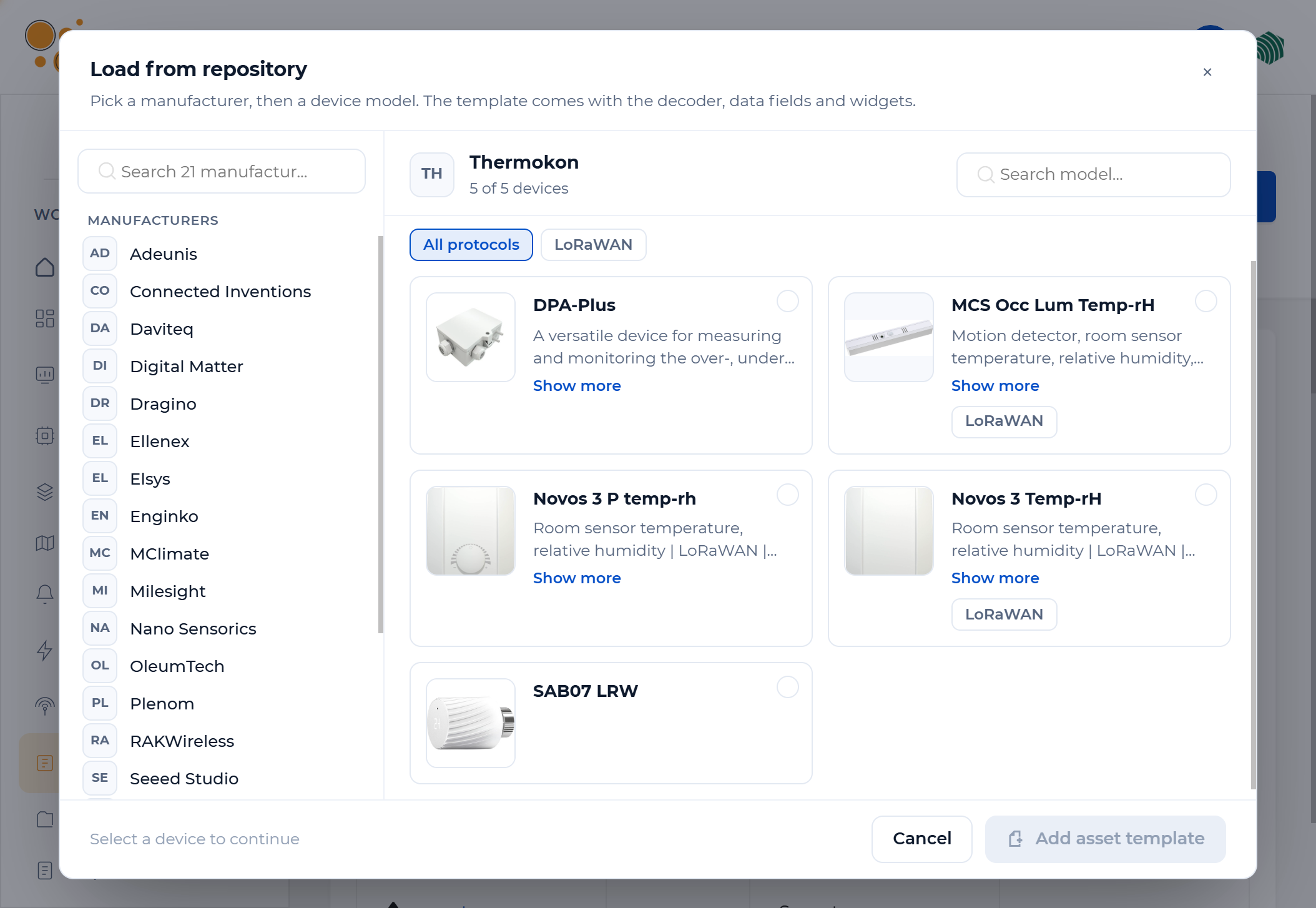
| Decoder language | JavaScript, executed in an isolated sandbox |
|---|---|
| Decoder input | HEX payload + metadata: type, RSSI, SNR, gateway EUI, fPort, fCnt |
| Downlinks | JSON → HEX encoder with named command fields |
| Testing | Built-in console for uplink and downlink codecs |
| State | Persistent per-device storage between messages |
| Repository | Supported devices catalogue with verified decoders |
| Connectivity | LoRaWAN, Sigfox, MQTT, HTTP webhook and more |
| Portability | Show as JSON, copy to another organisation, publish to the repository |
Most low-power IoT devices send compact binary payloads to save battery and airtime. A payload decoder is a small function that converts those bytes into named values such as temperature or battery voltage.
Usually yes. Vendor JavaScript codecs can be pasted into the decoder with minor changes to the function signature. Test them in the built-in console with a real payload before saving.
Check the supported devices catalogue. If a template exists, load it from the repository. If not, create one from scratch, or ask us and we can add it.
Yes. Add a downlink encoder to the template. Downlinks are sent through integrations that support them, such as The Things Stack, Actility, Helium, LORIOT, Loxone and the GreenMesh LoRaWAN Network Server.
Yes. The same template model is used for Sigfox, MQTT and HTTP webhook devices. Only the payload format and metadata differ.
Tell us which sensors and meters you use. We'll check repository support and help with templates for anything new.