IoT alerts and automation that react to real conditions
Widgelix Actions watch every reading from your devices and respond on their own: notify the right people, call your systems, or send a command back to the device. Rules fire on sustained situations, not one noisy value, so your team trusts every alert. (Actions were formerly called the Rule Engine.)
Most IoT platforms stop at “if value > X, send email”. In the field that means a flood of alerts from one spiky reading, a value that hovers around the limit, or a gateway outage that makes every sensor look offline. Teams start ignoring notifications, and the one alert that matters is missed.
One noisy reading triggers an alarm at 3 a.m.
A value hovering near the limit sends dozens of on/off alerts
A gateway goes down and hundreds of “device offline” alerts follow
Every sensor needs its own hand-built alert
How it works
IF → IS → THEN, configured in minutes
01
IF: choose what to watch
Pick an asset template and a data field (temperature, CO₂, level, battery), select assets from a list or on a map, or choose All to cover the whole fleet. You can also watch connectivity: asset offline, or gateway offline / back online.
02
IS: define the situation
Compare with a constant, a range, the live value of another device, or a geofence. Add a reset threshold and a persist duration so the action reflects a real, sustained condition.
03
THEN: respond automatically
Send an email, SMS, Slack, Discord or SIGNL4 alert, call any webhook, or send a downlink command to a valve, relay or thermostat. Several responses can run together.
Capabilities
Action logic built for real deployments
Every control below exists to cut false alarms and make automation safe to run without a human in the loop.
Multi-condition logic
Up to 10 statements per action, joined with AND or OR. Combine readings from different devices in one action.
Less than, equal, greater than, not equal, in range, out of range
Compare one device with another (indoor vs outdoor, supply vs return)
Asset offline and gateway connectivity conditions
Temporal control
Fire only when a condition holds for a set time, for example 10 minutes above 30 °C. Ignore short spikes without resetting the timer, and reset after a prolonged recovery.
Switching threshold range (hysteresis)
Trigger above 30 °C, re-arm only below 27 °C. Values that hover near the limit no longer flap between alarm and normal.
Alert suppression with dependencies
Make “sensor offline” depend on “gateway offline”. While the parent is active, child alerts stay silent, so you get one alert about the root cause instead of hundreds. A hold window handles near-simultaneous triggers.
Schedules, rate limits and trigger-once
Limit an action to business hours or overnight windows on a weekly timeline, cap execution to once per minute, hour or day, or fire once until the condition clears.
Geofences
Draw circles or polygons on a map and fire when a tracked asset enters or leaves an area. Combine with temporal control to ignore a single stray GPS fix.
Personalised messages for whole fleets
Insert live values and asset tags (floor, room, address) into messages. One action for a whole template still tells the recipient exactly which device, where, and what value.
Closed-loop control
An action can send a downlink back to a device: open an irrigation valve, close a water shut-off, switch a relay. Sensing and actuation run on the same platform.
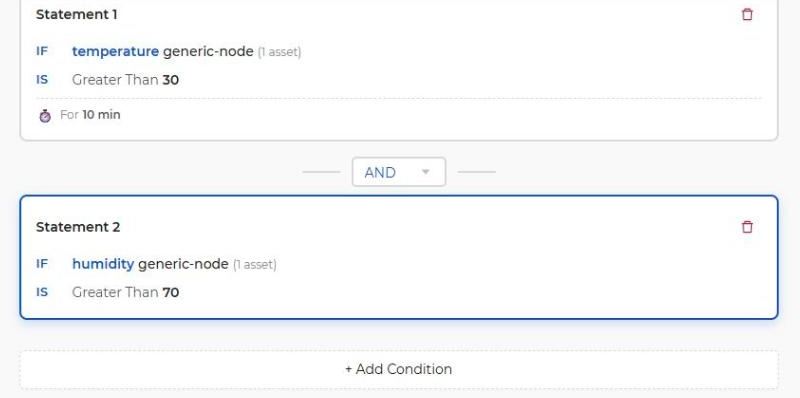
Every condition is readable at a glance
Statements show the device, the comparison and the persist duration on one card, so anyone on the team can review what an action does before it goes live.
At a glance
What you can configure
Condition types
Compare with constant, compare with another asset, geofence, asset offline, gateway offline / online
Operators
<, ≤, =, ≥, >, ≠, in range, out of range
Conditions per action
Up to 10, joined with AND / OR
False-alarm controls
Persist duration, ignore short spikes, reset after prolonged violation, switching threshold range
Frequency controls
Trigger once; execute every 1 min, 5 min, 15 min, 30 min, 1 h or 1 day
Scheduling
Weekly timeline in 30-minute steps, business-hours preset
Responses
Email, SMS, Slack, Discord, SIGNL4, Webhook, Downlink, Event only
Severity
Info, Warning, Critical
Escalation
Optional escalation chain with acknowledgement deadlines
“If soil moisture stays below 30 % for 2 hours during daytime, open the irrigation valve with a downlink and notify the field team on Slack.”
No. Actions are configured in a visual editor: pick the devices, the condition and the response. Code is only needed if you want custom payload decoding, which lives in the asset template.
+How do I avoid false alarms from noisy sensors?
Use temporal control so a condition must hold for a set time, ignore short spikes, and add a switching threshold range so the action only re-arms after the value has clearly recovered. Rate limits and trigger-once further reduce repeat notifications.
+Can one action cover hundreds of devices?
Yes. Select All assets of a template and use tag placeholders such as floor or room in the message. Each alert still names the exact device and location.
+Can an action control a device, not just send an alert?
Yes. The Downlink action sends a predefined command to a device, for example to close a valve or switch a relay, on integrations that support downlinks.
+Which notification channels are supported?
Email, SMS, Slack, Discord, SIGNL4 and generic webhooks, plus in-app events. Webhooks let you connect ticketing systems, BMS or any HTTP API.
+Can AI agents create actions?
Yes. Through the Widgelix MCP server, agents such as Claude or ChatGPT can create, clone, enable and check actions with the permissions of the connected user.