Organisation switcher
Search organisations by name or ID, pin favourites, see recent ones, and open an overview of all organisations sorted by name, assets, alerts or creation date, with asset, offline and critical counts on each card.
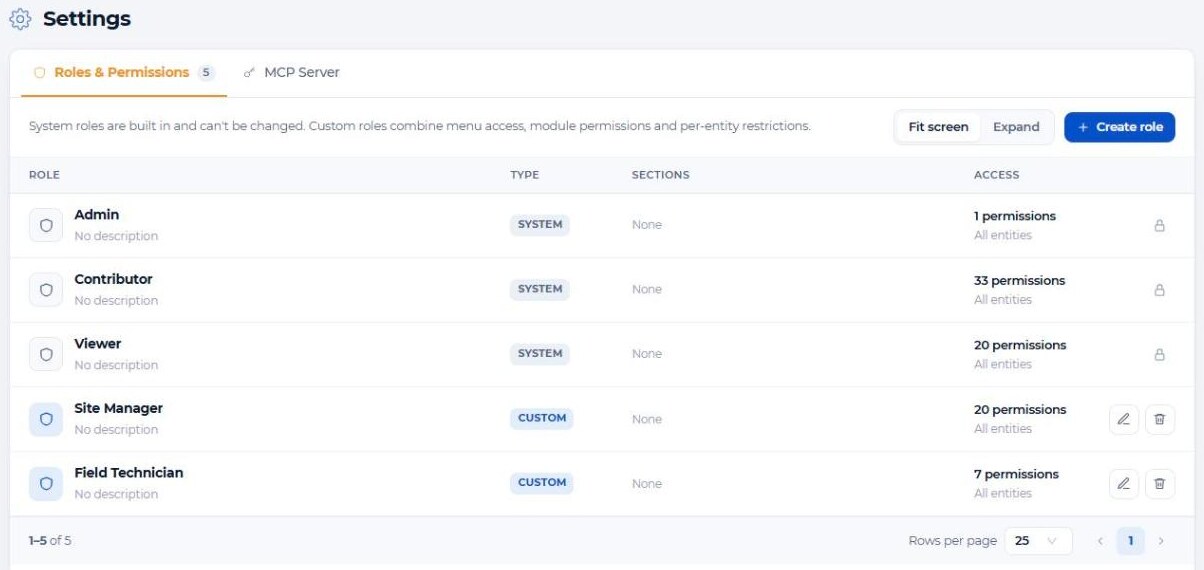
Give every customer, site or department its own organisation with separate data, users and dashboards, and manage all of them from one login. Custom roles decide who sees which menus, what they can change and which items they can access.
System integrators and operators run deployments for dozens of customers. Separate logins per customer are hard to manage, and a single shared account exposes everyone's data to everyone. Field technicians and customers need narrow access, not admin rights.
Create an organisation for each customer, site or department. Data, assets, dashboards and actions stay inside it.
Add users by email and give each one a role per organisation. One person can have different roles in different organisations.
Jump between organisations with the switcher, pin the ones you use most, and search assets across all your organisations at once.
Every API call is checked against the user's membership, role and item restrictions in that organisation.
Search organisations by name or ID, pin favourites, see recent ones, and open an overview of all organisations sorted by name, assets, alerts or creation date, with asset, offline and critical counts on each card.
Global search can look in all your organisations at once, and results respect the permissions you have in each.
Admin (full access), Contributor (works with all modules, optional delete rights) and Viewer (read-only).
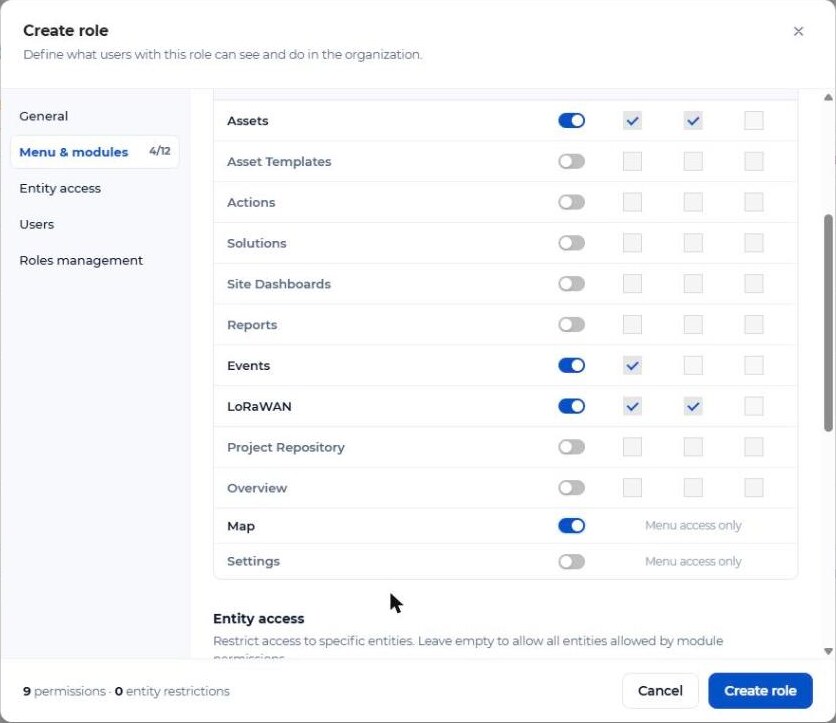
Choose which sections appear in the menu and grant Read, Write or Delete per module: assets, asset templates, actions, solutions, site dashboards, reports, events, LoRaWAN, project repository and overview.
Limit a role to selected assets, asset templates, actions, solutions, site dashboards, reports, projects or LoRaWAN gateways, devices and profiles. Perfect for a contractor responsible for one site.
Users can't grant roles more rights than they hold themselves, and roles still assigned to users can't be deleted by accident.
Transfer an asset to another organisation by its ID (its template is copied along), or copy an asset template to another organisation you manage.
Fleet status, asset quota, SMS balance, LoRaWAN gateways, alerts in the last 24 hours and the user list on one page, with your organisation logo.
Custom roles combine menu access with Read, Write and Delete rights per module. Write and Delete always require Read, so roles stay consistent.
| Organisations per user | Many organisations per login, one role in each |
|---|---|
| Switching | Org switcher with search, pinned and recent; all-organisations overview |
| Cross-org search | “Search in all my organizations”, permission-aware |
| System roles | Admin, Contributor (optional delete), Viewer |
| Custom roles | Menu access + Read/Write/Delete per module, user and role management rights |
| Item restrictions | Assets, templates, actions, solutions, site dashboards, reports, projects, LoRaWAN items |
| Transfers | Asset transfer between organisations; copy asset template to another organisation |
| Branding | Organisation logo; white-label for partners with your domain, colours, language and email sender |
| Sign-in | Email and password |
Yes. One login can belong to many organisations. Switch between them with the organisation switcher and search across all of them at once.
Yes. Roles are assigned per organisation, so someone can be Admin in one and Viewer in another.
Yes. Create a custom role and restrict it to the assets, dashboards or actions of that site. The contractor sees nothing else.
Yes. Transfer the asset using the target organisation's ID; its asset template is copied along. Collected history stays behind, so transfer before going live.
Yes, for partners. Our team sets up white-label for your domain, with your product name, colours, interface language and email sender. Every organisation can also upload its own logo.
Sign-in is with email and password today.
Tell us how many customers, sites and user groups you serve. We'll show you an organisation and role setup that fits.